
Web Design Training courses, videos & tutorials at DigitalFamily.com
Web design & Internet trends
books, videos, training & consulting
  • Home
  • Store
    • Web Design Books
    • Dreamweaver Videos
    • Expression Web Videos
    • Products
    • Shopping Cart
    • Order Status
  • Consulting Services
  • Web Tutorials
    • Web Design 101
    • Mobile and Responsive Web Design
    • Social Media
    • Online Reputation
    • Dreamweaver
    • Expression Web
    • Cascading Style Sheets
    • WordPress
  • Dreamweaver
    • CS6 Tutorials
    • CS5 Tutorials
    • CS4 Tutorials
    • CS3 Tutorials
  • FAQ
    • Dreamweaver
    • CSS
    • Graphics
    • WordPress
    • Ask the Author
  • About Us
    • About DigitalFamily.com
    • About Janine Warner
  • Contact
Search the site...

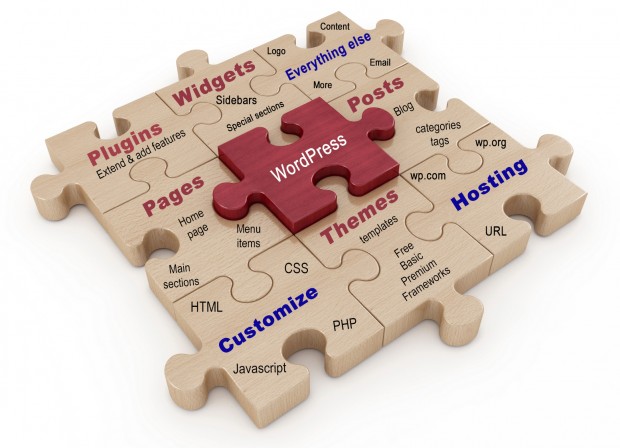
You can use WordPress to create blogs and websites

Home» WordPress

Which is better Dreamweaver or WordPress?

Whether it’s best to use Dreamweaver or WordPress to create a website depends on what type of site you want to create, how big the site will be, and your skills.

Only you know if your greatest talent is as a designer, writer, programmer, photographer, project manager, or all-around techno-wizard who is just dedicated enough to pull it all off yourself.

Although there are some efficiencies to creating large websites and blogs with WordPress, if you want to have a lot of design control over your pages, your best option is a program like Dreamweaver.

And they’re not mutually exclusive. You can use Dreamweaver to edit WordPress pages and get a best-of-both-worlds solution. Read More…

Editing WordPress Posts and Themes with Dreamweaver

Dreamweaver CS5 provides much better support for WordPress than any previous versions, but you’ll still have to set up a local testing environment if you want WordPress files to work on your local computer the way they work on your server.

How does Dreamweaver work with WordPress?

You can create a completely custom dynamic site as complex as a blog with Dreamweaver, but these days most lazy (and smart) designers start with a program like WordPress — and then use Dreamweaver to create or edit the themes that control the design and the posts that are added to the blog. Read More…

How do I move my domain name?

Dear Janine, I really learned a lot during your WordPress workshop on creativeLIVE and now I’m attempting to put all the pieces together & would appreciate any guidance on how to transfer my domain name. I have a Smugmug Photo website that I am going to stop using & cancel so I can make my [...]

Read More

Never have an outdated copyright date again

Ever notice how many websites and blogs have a copyright message at the bottom of the page that is still set to last year — or worse, several years ago? Here’s a quick easy trick to make sure that never happens to you. In the copyright field, instead of entering a date, like 2013, enter [...]

Read More

Customizing WordPress Designs with Themes and Frameworks

WordPress is remarkably simple to use when it comes to adding posts and pages, but things can get tricky quickly when you want to customize the design or create complex page layouts. You can create custom WordPress designs in at least three ways: 1. Learn HTML, CSS, and at least a little PHP, and you [...]

Read More
Designing-for-multiple-devices-500

How to create a responsive web design that adjusts to different screen sizes

Many web designers are calling 2013 The Year of Responsive Design. Responsive web design is increasingly popular because the biggest challenge of web design today is that your pages are as likely to be projected on a giant computer monitor as on a tiny cell phone screen. With responsive design, you create one web page [...]

Read More

WordPress.com vs. WordPress.org?

So you’ve decided to design your website or blog using WordPress, the super popular open-source content management system (CMS), but now you have to answer the next question. Should you set up your site at WordPress.com, which makes everything super easy, but with some limitations and advertising (unless you pay to avoid their ads). Or, [...]

Read More

Where do I find Google checkout orders?

Janine, I watched your tutorial on Kelby training about DIY ECOMMERCE using Google shopping cart with WordPress. Great. I had one question I don’t think was covered that I hope you can answer. “When the customer has paid  for the product, where does the order go to get fulfilled. Is it in the setup portion [...]

Read More

What’s the difference between a website & blog?

Dreamweaver vs WordPress

You might be surprised how many people are confused about the difference between a website and a blog, and how complicated it is to answer the question about which one is better…

Essentially, a blog (short for web log) is just a special kind of web site. Blogs are designed to make it easy for anyone to post text and images to the Internet (even if you don’t know HTML, the language of web design).

Read More

Great Examples of Responsive Web Design

If you’re looking for evidence of the growing popularity of responsive web design, just Google the phrase: “responsive web design examples,” and you’ll find numerous collections of design examples. Here are a few responsive designs to give you a flavor for what responsive design is all about. FoodSense.is BostonGlobe.com Anderson Wise Architects Antonio Gaudi example [...]

Read More
Favicon-Google

How to Add a Favicon Image to Your Web Site

Have you ever wondered how some sites add those little custom graphics to the very top of the browser in the address bar next to the URL? Google adds a capital G, Adobe adds their  A logo, we include the swoosh from our logo, and you can add any image to your site, too. Creating [...]

Read More
  • 1
  • 2
  • 3
  • 4
  • 5

Share with your friends

Recent Posts

  • How do I move my domain name?
  • Never have an outdated copyright date again
  • Customizing WordPress Designs with Themes and Frameworks
  • 3 Steps to a Great Facebook Timeline Design
  • Facebook Timeline Cover Image Template

Popular Books & Videos

  • Dreamweaver CS6 Video

    DW-Video-250
    Designing for Multiple Screens with Fluid Grid Layouts
    Discover how to create web designs that look great on large and small screens. From smartphones to tablets to desktops, the new Fluid Grid Layout in version CS6 makes it easier than ever to set up media queries and design websites with HTML5 and CSS3. More Info »
    $49.99$39.99

    View Cart / Checkout
  • Dreamweaver CS6 For Dummies

    9781118212332.pdf
    Whether you’re an experienced Web designer or you just want to look like one, you’ll appreciate the power of Dreamweaver, the most popular program among professional Web designers. Even if you’re just getting started, you can master this award-winning program with Dreamweaver CS6 For Dummies. More Info »
    $21.99

    View Cart / Checkout
  • Web Sites For Dummies

    Web Sites For Dummies
    Web Sites Do-It-Yourself For Dummies gives you simple, step-by-step instructions to build your confidence as you build your site. More Info »
    $21.99

    View Cart / Checkout
  • CSS Basics: A Refreshing Way to Learn Cascading Style Sheets

    CSS-Basics-DVD
    Training video DVD
    Whether you are completely new to designing with Cascading Style Sheets, or you really want to master the basics of CSS, Janine's crash course will get you up to speed quickly. More Info »
    $24.99

    View Cart / Checkout
  • Creating CSS Layouts: Getting More Advanced with Cascading Style Sheets

    CSS-Advanced-DVD-500
    Training Video DVD
    Dive deep and learn more advanced techniques with Cascading Style Sheets in Part 2 of Janine's CSS training series. More Info »
    $24.99

    View Cart / Checkout
  • Dreamweaver CS5 Crash Course

    Dreamweaver CS5 Crash Course Part 1
    Dreamweaver video DVD
    Dip into web design and learn Dreamweaver fast with this engaging video. More Info »
    $24.99

    View Cart / Checkout
  • iPhone & iPad Web Design For Dummies

    iPhone-iPad-500
    By Janine Warner, David LaFontaine & Lee Andron Wiley Publishing A full-color guide to designing cutting-edge Web sites for the iPhone, iPad, and iPod touch! Apple’s touchscreen iOS devices have created worldwide techno-lust, and a hot new market out of thin air. iPads and iPhones are so in demand they outsell every other device in their category. With all More Info »
    $21.99

    View Cart / Checkout
  • Mobile Web Design For Dummies

    Mobile Web Design For Dummies
    At first glance, the sheer rate of change in the mobile web can seem intimidating. If the regular internet is a moving target, then the mobile web is a cheetah! With our help, you'll discover what makes a great mobile Web site, the technologies that help you get around the limitations, and how to pack a punch on the small screen. More Info »
    $19.99

    View Cart / Checkout

Related tips & tutorials

browsers change how a wordpress blog looks cms content strategy css customize blog appearance design trends drop-down menu dwcs3 dwcs4 dwcs5 dwcs6 ecommerce edit wordpress blog expression-web extensions Flash forms ftp graphics HTML inverted pyramid iPad Apps links media queries mobile web design online reputation responsive SEO social media social media aggregation social media design tools. social media measurement tools templates testimonials video web content web design web hosting website wordpress writing for the web
© 2001 - 2013 All rights reserved. DigitalFamiliy.com was created by Janine Warner | Terms & Conditions of Use | Privacy Policy
  • Home
  • Store
  • Consulting Services
  • Web Tutorials
  • Dreamweaver
  • FAQ
  • About Us
  • Contact