
Web Design Training courses, videos & tutorials at DigitalFamily.com
Web design & Internet trends
books, videos, training & consulting
  • Home
  • Store
    • Web Design Books
    • Dreamweaver Videos
    • Expression Web Videos
    • Products
    • Shopping Cart
    • Order Status
  • Consulting Services
  • Web Tutorials
    • Web Design 101
    • Mobile and Responsive Web Design
    • Social Media
    • Online Reputation
    • Dreamweaver
    • Expression Web
    • Cascading Style Sheets
    • WordPress
  • Dreamweaver
    • CS6 Tutorials
    • CS5 Tutorials
    • CS4 Tutorials
    • CS3 Tutorials
  • FAQ
    • Dreamweaver
    • CSS
    • Graphics
    • WordPress
    • Ask the Author
  • About Us
    • About DigitalFamily.com
    • About Janine Warner
  • Contact
Search the site...
Home» Tutorials » Expression Web » Add Meta Keywords and Descriptions for Search Engine Optimization

Add Meta Keywords and Descriptions for Search Engine Optimization

Posted by Janine Warner - September 8, 2012 - Expression Web, Tutorials
0

You’ll never see the contents of Meta tags displayed in a Web page, which can make them easy to forget, but taking a few minutes to fill in Meta descriptions and keywords can help improve your ranking in search engines.

Although many search engines ignore Meta keywords because of abuses by Web designers trying to trick their way to the top of search results, many search engines do still use the Meta description when a site is listed in search engine results. Even if this setting doesn’t make a big difference in your search engine results, it only takes a few minutes to add Meta tags to the head part of an HTML document, and it can’t hurt.

Here’s how to add Meta content with Expression Web:

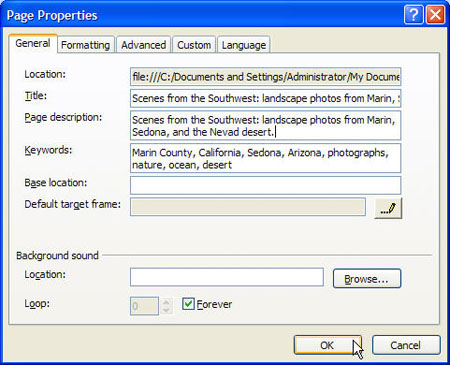
1. Choose File > Properties to open the Page Properties dialog.
Insert Figure EW Tutorial 6-1.jpg


First make sure you add a Title, it’s not a meta tag, but it does appear in the head region of the page so it’s included in this dialog and it does affect search engine placement because some search engines put higher priority on text in the title area. Title text is also the text that appears at the top of the browser window and is saved when someone bookmarks a page.

The Page Description represents the meta description tag. Any text you enter in this field will be included in the meta description tag in your HTML code.

Note: You can only enter text into this field, and some search engines will cut off a description after 20 or 25 words, others will display up to 50 words, so make sure you include the most important part of your description in the first few words of text.

Although the Keyword meta tag is ignored by most search engines these days – I’m afraid too many people tried to trick search engines by entering misleading keywords so they stopped supporting this tag –some still honor it so you might as well enter a series of keywords that apply to your site. In this example, I might enter: Marin County, California, Sedona, Arizona, photographs, nature, ocean, and desert.

Now I have to note here that your chances of improving search engine ranking with common terms like ocean and desert are slim. Competition for common terms in search engines is fierce and it takes a lot more than Meta tags to make a difference. The more specific you can be in your Meta description, title, and keywords, and the better that text matches the content of your site, the more likely you are to improve your search engine results.

expression-web

Leave a Reply Cancel reply

Your email address will not be published. Required fields are marked *

You may use these HTML tags and attributes: <a href="" title=""> <abbr title=""> <acronym title=""> <b> <blockquote cite=""> <cite> <code> <del datetime=""> <em> <i> <q cite=""> <strike> <strong>

Share with your friends

Expression Web Tutorials

  • How to Add a Favicon Image to Your Web Site
  • Test Your CSS Before You Publish with Expression Web
  • How to Test Web Site Accessibility with Microsoft Expression Web
  • Make Global Updates with Dynamic Web Templates in Expression Web
  • Create a Rollover with the Swap Image Behavior

Expression Web Products

  • Microsoft Expression Web Essentials Training Video for versions 2 & 3

    expressionweb2_ess-lg
    Training Video
    Janine's best-selling Expression Web training video starts with the basics and takes you through more advanced features, including in CSS, templates, and more. You'll get a solid introduction to web design, as you learn Microsoft Expression Web, and you're sure to love Janine's patient (and fun!) teaching style. This video works for both Expression We 2 and 3. More Info »
    $49.99$25.00

    View Cart / Checkout
© 2001 - 2013 All rights reserved. DigitalFamiliy.com was created by Janine Warner | Terms & Conditions of Use | Privacy Policy
  • Home
  • Store
  • Consulting Services
  • Web Tutorials
  • Dreamweaver
  • FAQ
  • About Us
  • Contact