
Web Design Training courses, videos & tutorials at DigitalFamily.com
Web design & Internet trends
books, videos, training & consulting
  • Home
  • Store
    • Web Design Books
    • Dreamweaver Videos
    • Expression Web Videos
    • Products
    • Shopping Cart
    • Order Status
  • Consulting Services
  • Web Tutorials
    • Web Design 101
    • Mobile and Responsive Web Design
    • Social Media
    • Online Reputation
    • Dreamweaver
    • Expression Web
    • Cascading Style Sheets
    • WordPress
  • Dreamweaver
    • CS6 Tutorials
    • CS5 Tutorials
    • CS4 Tutorials
    • CS3 Tutorials
  • FAQ
    • Dreamweaver
    • CSS
    • Graphics
    • WordPress
    • Ask the Author
  • About Us
    • About DigitalFamily.com
    • About Janine Warner
  • Contact
Search the site...
Home» Tutorials » Social Media » 3 Quick Tips to Attract More Visitors to Your Web Site

3 Quick Tips to Attract More Visitors to Your Web Site

Posted by Janine Warner - September 7, 2012 - Social Media, Tutorials
0

My friend Amy sent me an email asking why her pages seem to be scoring worse in Google these days and how to better promote her site. Her message reminded me that creating the pages of a Web site is only part of the process. (Visit Amy’s site at inplainsightart.com to see her beautiful glass and ceramic designs and decals.)
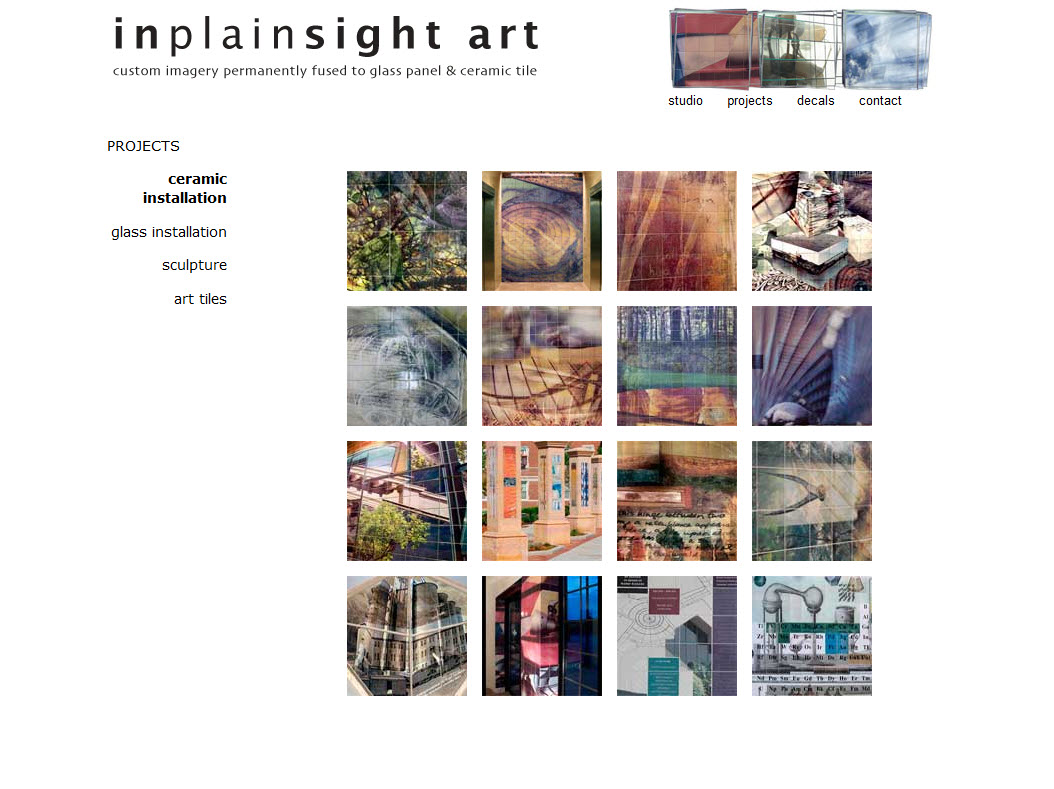
InPlainSightArt

In Plain Sight Art creates custom imagery permanently fused to glass and ceramic tile.

Most of my books and videos are about how to build Web sites, but increasingly I find myself answering questions about building an audience. That means everything from Search Engine Optimization (SEO), and how to score high in Google, to whether Social Media is worth the effort.

In my new social media newsletter (sign up here), I share tips for promoting web sites that have caught my interest and consistently worked. Here’s one of the most important:

Search Bots Can’t See Pretty Pictures

If you want to score high in Google, offer valuable content and update it regularly. It’s one of the few things that everybody agrees attracts search traffic and is one of the reasons adding a blog to your website boosts Google rank.

Your site may be stunning to look at, but Google is focused on text. Bots aren’t into pretty pictures. If you have an image-heavy site, take a few minutes to add some text (even if you put it “below the fold”) to provide Google something that it can use to match up with keyword searches.

Answer Their Questions Before They Ask

Most people don’t enter keywords into Google — they enter questions like, “How do I get bubble gum out of a longhair cat?”

How do you answer their questions before they ask? Our pet sitter provides helpful information on her web site, and she sends out a newsletter every month with reminders about vaccinations and tips caring for growing pets. It’s useful, it reminds me that she’s there, and makes it easy to find her contact information when I need her. (Here’s an article about why bulk email services are important.)

Here at DigitalFamily.com, I give away a lot of free tips and answers to common questions about web design, and it brings me a lot of traffic from Google. I’m not the only one giving away information to attract an audience– the ‘freemium model’ works well on the web, especially if you sell a niche product or service.

Google is Complicated

Google ranks sites based on some 250 variables and Google is constantly changing them.Expect your Google rank to fluctuate and beware, if your competitors are smarter than you are about increasing the rank of their sites, you can drop down the list fast.

To attract the right people to your site, consider writing 3 Tips that answer some of the common questions you got in 2010; not specific instructions for using your product or service, but general tips that you think are likely to help your audience.

Then turn those tips into your next 3 blog posts, email them in a series of newsletters, and add them as a page of tips to your site. Don’t overthink it, write up short answers to three common questions as if you were writing an email to a friend — it will make it feel less like a chore and help you find a friendly voice.

If you want to extend your reach, shorten each tip to 140 characters and tease them with a link on Twitter or Facebook.

I hope my tips help you attract just the right audience and I wish you all the best in 2011,

Janine

Want more detailed instructions? Here are 10 ways to make your Dreamweaver site more search-engine friendly.

SEO, social media

Leave a Reply Cancel reply

Your email address will not be published. Required fields are marked *

You may use these HTML tags and attributes: <a href="" title=""> <abbr title=""> <acronym title=""> <b> <blockquote cite=""> <cite> <code> <del datetime=""> <em> <i> <q cite=""> <strike> <strong>

Share with your friends

More on Social Media & Online Reputation

  • 3 Steps to a Great Facebook Timeline Design
  • Facebook Timeline Cover Image Template
  • My favorite social media tools to design and build your network, measure influence, and track trends
  • Should you create a Facebook Fan Page, Group, or Profile?
  • 10 Social Media Tools Everyone Should Use

Popular books & videos

  • Dreamweaver CS6 Video

    DW-Video-250
    Creating Responsive Designs for small and large screens with Fluid Grid Layouts
    Discover how to create web designs that look great on large and small screens. From smartphones to tablets to desktops, the new Fluid Grid Layout in version CS6 makes it easier than ever to set up media queries and design websites with HTML5 and CSS3. More Info »
    $49.99$39.99

    View Cart / Checkout
  • Dreamweaver CS6 For Dummies

    9781118212332.pdf
    Whether you’re an experienced Web designer or you just want to look like one, you’ll appreciate the power of Dreamweaver, the most popular program among professional Web designers. Even if you’re just getting started, you can master this award-winning program with Dreamweaver CS6 For Dummies. More Info »
    $21.99

    View Cart / Checkout
  • Web Sites For Dummies

    Web Sites For Dummies
    Web Sites Do-It-Yourself For Dummies gives you simple, step-by-step instructions to build your confidence as you build your site. More Info »
    $21.99

    View Cart / Checkout
  • CSS Basics: A Refreshing Way to Learn Cascading Style Sheets

    CSS-Basics-DVD
    Training video DVD
    Whether you are completely new to designing with Cascading Style Sheets, or you really want to master the basics of CSS, Janine's crash course will get you up to speed quickly. More Info »
    $24.99

    View Cart / Checkout
  • Creating CSS Layouts: Getting More Advanced with Cascading Style Sheets

    CSS-Advanced-DVD-500
    Training Video DVD
    Dive deep and learn more advanced techniques with Cascading Style Sheets in Part 2 of Janine's CSS training series. More Info »
    $24.99

    View Cart / Checkout
© 2001 - 2013 All rights reserved. DigitalFamiliy.com was created by Janine Warner | Terms & Conditions of Use | Privacy Policy
  • Home
  • Store
  • Consulting Services
  • Web Tutorials
  • Dreamweaver
  • FAQ
  • About Us
  • Contact