
Web Design Training courses, videos & tutorials at DigitalFamily.com
Web design & Internet trends
books, videos, training & consulting
  • Home
  • Store
    • Web Design Books
    • Dreamweaver Videos
    • Expression Web Videos
    • Products
    • Shopping Cart
    • Order Status
  • Consulting Services
  • Web Tutorials
    • Web Design 101
    • Mobile and Responsive Web Design
    • Social Media
    • Online Reputation
    • Dreamweaver
    • Expression Web
    • Cascading Style Sheets
    • WordPress
  • Dreamweaver
    • CS6 Tutorials
    • CS5 Tutorials
    • CS4 Tutorials
    • CS3 Tutorials
  • FAQ
    • Dreamweaver
    • CSS
    • Graphics
    • WordPress
    • Ask the Author
  • About Us
    • About DigitalFamily.com
    • About Janine Warner
  • Contact
Search the site...
Home» Tutorials » Expression Web » Test Your CSS Before You Publish with Expression Web

Test Your CSS Before You Publish with Expression Web

Posted by Janine Warner - September 8, 2012 - Expression Web, Tutorials
0

Cascading Style Sheets are great for creating designs on the Web, but with these powerful design options come many chances to make mistakes…

How to run a CSS Report in Expression Web:

1. Choose Tools > CSS Reports.
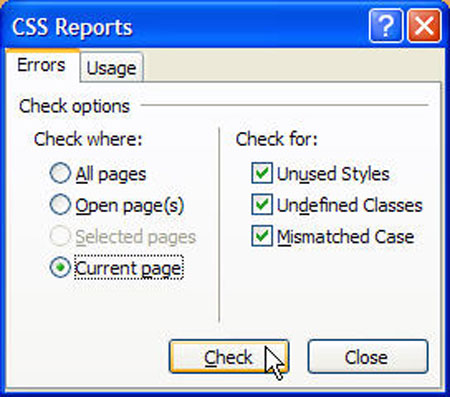
Figure EW Tutorial 10-1.jpg


2. Under the Errors tab in the CSS Reports dialog, specify whether you want to check All pages, Open pages, Selected pages, or the Current page. If you choose selected pages, click to highlight the pages you want to check in the Folder List task pane. In this example, I’ve selected Current page to check only the page I have open in Expression Web.

Next click to check the box if you want to check for:

Unused Styles: this option produces a list of class-based, id-based, and element-based styles that are defined in a CSS and not used in your web pages.

Undefined Classes: this option lists class-based styles that are used in a web page but aren’t defined in a CSS.

Mismatched Case:  This option lists class-based and id-based styles that are defined with a case that is different than the case of a reference to that style. For example, if your style sheet defines a class that is named “.image-right” and a web page references “.Image-Right”, this style will appear in the report.

Click Check to run the report and Expression Web will list any errors in the bottom of the page as shown in the image below.
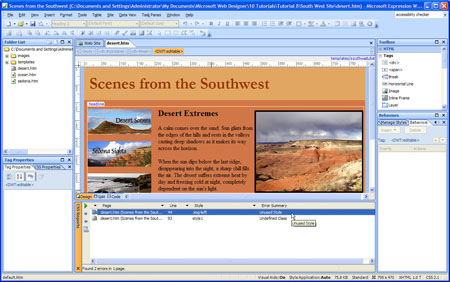
Figure EW Tutorial 10-2.jpg


3. Next, you can run more reports by clicking on the Usage tab.

Again, specify which pages should be checked as you did in step b above.
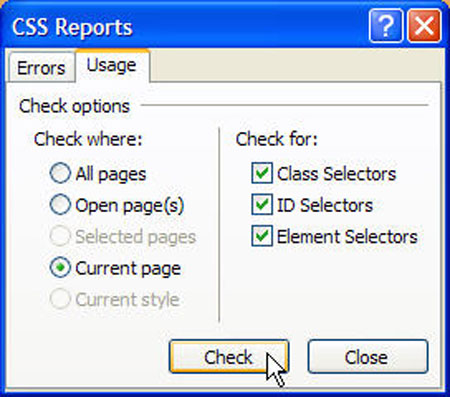
Figure EW Tutorial 10-3.jpg


Under Check for, select any or all of the following:

Class Selectors: this option generates a list of all of the class-based styles that are used on a page or site, any web pages that are using those styles, and the location of the style definition.

ID Selectors: this option generates a list of ID-based styles that are used on a page or site, any web pages that are using those styles, and the location of the style definition.

Element Selectors: this option generates a list of element styles that that are used on a page or site, any web pages that are using those styles, and the location of the style definition.

Click Check to run the report and the results will be displayed at the bottom of the page as shown in the figure below.
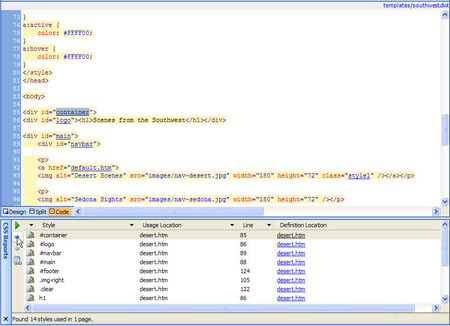
Figure EW Tutorial 10-4.jpg


Click on the name of any style to open the external style sheet or display the code section of the page where that style is defined. You can also use the blue arrows on the left to move through the styles, displaying each style in turn that is listed in the report.

expression-web

Leave a Reply Cancel reply

Your email address will not be published. Required fields are marked *

You may use these HTML tags and attributes: <a href="" title=""> <abbr title=""> <acronym title=""> <b> <blockquote cite=""> <cite> <code> <del datetime=""> <em> <i> <q cite=""> <strike> <strong>

Share with your friends

Expression Web Tutorials

  • How to Add a Favicon Image to Your Web Site
  • How to Test Web Site Accessibility with Microsoft Expression Web
  • Make Global Updates with Dynamic Web Templates in Expression Web
  • Create a Rollover with the Swap Image Behavior
  • Add Meta Keywords and Descriptions for Search Engine Optimization

Expression Web Products

  • Microsoft Expression Web Essentials Training Video for versions 2 & 3

    expressionweb2_ess-lg
    Training Video
    Janine's best-selling Expression Web training video starts with the basics and takes you through more advanced features, including in CSS, templates, and more. You'll get a solid introduction to web design, as you learn Microsoft Expression Web, and you're sure to love Janine's patient (and fun!) teaching style. This video works for both Expression We 2 and 3. More Info »
    $49.99$25.00

    View Cart / Checkout
© 2001 - 2013 All rights reserved. DigitalFamiliy.com was created by Janine Warner | Terms & Conditions of Use | Privacy Policy
  • Home
  • Store
  • Consulting Services
  • Web Tutorials
  • Dreamweaver
  • FAQ
  • About Us
  • Contact