
Web Design Training courses, videos & tutorials at DigitalFamily.com
Web design & Internet trends
books, videos, training & consulting
  • Home
  • Store
    • Web Design Books
    • Dreamweaver Videos
    • Expression Web Videos
    • Products
    • Shopping Cart
    • Order Status
  • Consulting Services
  • Web Tutorials
    • Web Design 101
    • Mobile and Responsive Web Design
    • Social Media
    • Online Reputation
    • Dreamweaver
    • Expression Web
    • Cascading Style Sheets
    • WordPress
  • Dreamweaver
    • CS6 Tutorials
    • CS5 Tutorials
    • CS4 Tutorials
    • CS3 Tutorials
  • FAQ
    • Dreamweaver
    • CSS
    • Graphics
    • WordPress
    • Ask the Author
  • About Us
    • About DigitalFamily.com
    • About Janine Warner
  • Contact
Search the site...
Home» Tutorials » Expression Web » Make Global Updates with Dynamic Web Templates in Expression Web

Make Global Updates with Dynamic Web Templates in Expression Web

Posted by Janine Warner - September 8, 2012 - Expression Web, Tutorials
0

When you create a web site with Dynamic Web Templates you can simplify your design work, create new pages faster, and make global updates.

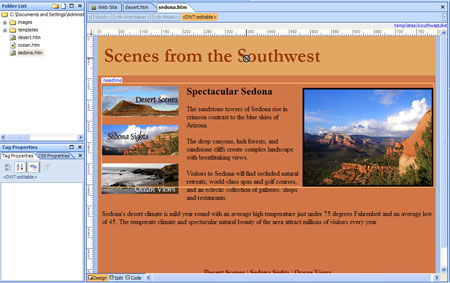
The three pages in the site shown in this example were all created from a Dynamic Web Template. Some of the areas of the template are editable, for example, I can change the headline, story, and photo on each of these pages, but other areas are locked, like the banner and navigation elements. You can tell when a region is locked because the cursor changes to a circle with a line through it when it is passed over a locked regions and you are unable to select anything in that part of the page.
Insert Figure EW Tutorial 8-1.jpg
When you work with Dynamic Web Templates, you can only change locked regions in the template file. This is by design as it enables you to protect certain areas of the page from being accidentally changed, and it enables you to make changes to that area of the page and have those changes automatically applied to multiple pages at once.

Follow these instructions to make global updates with templates in Expression Web:

1. To update pages that were created from a Dynamic Web Template, you need to find the .dwt file and open it. You can open a .dwt file just like you would open any other page in Expression Web and you can edit it in the same way as well.

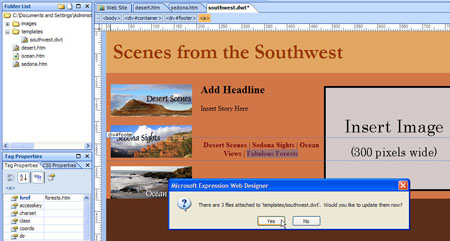
For example, if you decide you want to add a new section to your site some day, let’s say I wanted to add a section to this site called Fabulous Forests, I can make that change to the template, and when I save the template, Expression Web will offer to automatically update the change in all of the pages created from the template.
Insert Figure EW Tutorial 8-2.jpg


2. Choose Yes, and all of the pages that were created from the template will automatically be updated.

It takes a little more time to set up a site with a template in the first place, but it makes updates so much faster and easier, you’ll often find it’s worth it in the long run.

expression-web

Leave a Reply Cancel reply

Your email address will not be published. Required fields are marked *

You may use these HTML tags and attributes: <a href="" title=""> <abbr title=""> <acronym title=""> <b> <blockquote cite=""> <cite> <code> <del datetime=""> <em> <i> <q cite=""> <strike> <strong>

Share with your friends

Expression Web Tutorials

  • How to Add a Favicon Image to Your Web Site
  • Test Your CSS Before You Publish with Expression Web
  • How to Test Web Site Accessibility with Microsoft Expression Web
  • Create a Rollover with the Swap Image Behavior
  • Add Meta Keywords and Descriptions for Search Engine Optimization

Expression Web Products

  • Microsoft Expression Web Essentials Training Video for versions 2 & 3

    expressionweb2_ess-lg
    Training Video
    Janine's best-selling Expression Web training video starts with the basics and takes you through more advanced features, including in CSS, templates, and more. You'll get a solid introduction to web design, as you learn Microsoft Expression Web, and you're sure to love Janine's patient (and fun!) teaching style. This video works for both Expression We 2 and 3. More Info »
    $49.99$25.00

    View Cart / Checkout
© 2001 - 2013 All rights reserved. DigitalFamiliy.com was created by Janine Warner | Terms & Conditions of Use | Privacy Policy
  • Home
  • Store
  • Consulting Services
  • Web Tutorials
  • Dreamweaver
  • FAQ
  • About Us
  • Contact