
Here’s why it works better
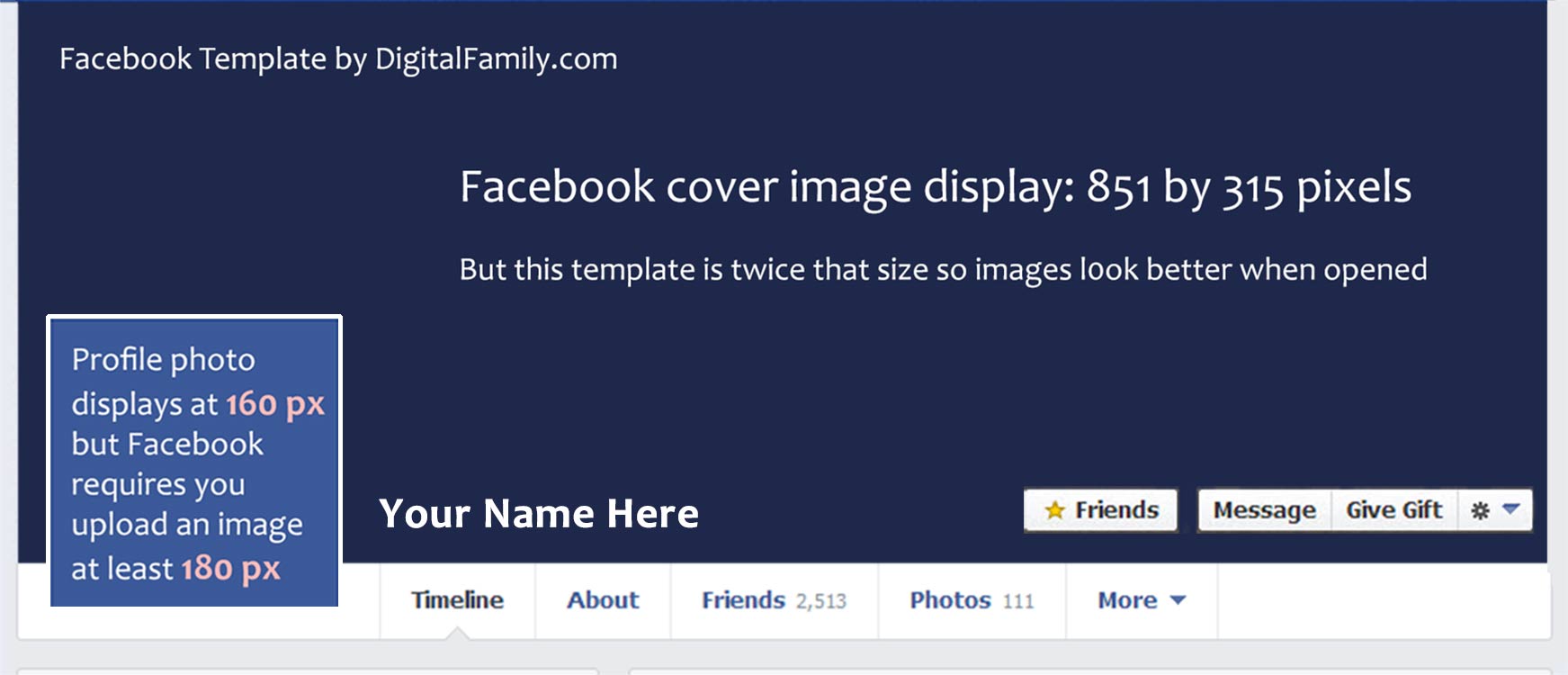
Facebook-Template- Updated 3-2014
Click to view template’s actual size. Your images will be displayed at half this size in your Timeline, but will be larger in other areas of Facebook.
Why bigger photos are better in Facebook cover designs (free template & tips to prove it)
After considerable testing, I’ve found that profile photos are displayed at 160×160 pixels at the top of your main profile page — as they are in every Facebook template I’ve ever found on the Web.
However, if you try to upload a profile photo that’s 160 pixels wide, you’ll receive a Facebook error stating that your profile image must be at least 180 pixels wide. Confusing, right?
Here’s the deal – You can’t upload profile photos that are smaller than 180 pixels, but you can upload images that are larger.
For best results, upload images that are bigger than recommended
Most of the advice you’ll find about Facebook’s cover images is even more confusing. Facebook’s Help files (and most templates) state that your cover image should be exactly 851 pixels wide by 315 pixels tall.
But larger is better because when you click on a cover photo and the image opens in a new window over the profile page, your photo is displayed in its actual size (or as close to full size as the space in your browser window allows). And bigger images definitely look better on the big monitors so many of us use.
Here’s what I found: If you upload a cover image that is smaller than 851×315 pixels, Facebook will stretch it to fit the display area. But if you upload a larger cover photo that’s larger, Facebook will reduce the image so that it displays just fine in your profile page, and you’ll have the benefit of the larger size when someone clicks on it. Note: For best results, keep your cover image the same aspect ratio as the recommended 851×315 or it will get cropped to fit.
Warning: The most limiting factor when it comes to design cover images is that you need to keep the total file size of each image less than 100 KB. If the file size is larger, Facebook will compress it for you, and you’ll almost certainly get better results if you optimize your images using the Save for Web dialog in Photoshop.
How to use this Facebook Timeline template
The template is designed to serve as a guideline to help you get your photos into the correct sizes and see how they fit together.
- Download the template in the format you prefer using the links below.
- Open the template in Photoshop, Photoshop Elements, or your favorite image editor.
- Open any image(s) you want to use in your Timeline and copy and paste them into the template.
- Resize and adjust your images, using the template as a guide for how they will fit together on Facebook.
- Once you get the images the way you want them, crop out each image separately (turning layers on and off as necessary).
- Export the smaller profile photo and the big cover image as two separate pieces (as jpegs) and upload those to Facebook.
- Note: You don’t need to resize your images before exporting them. If you design your page at the size of this template, Facebook will make them fit nicely in your profile.
Note: Profile photos display at 160-pixels wide, but Facebook requires that you upload a photo that is at least 180-pixels wide. Facebook accepts profile photos that are even larger, and they often look better that way, which is why this template is twice the size of most Facebook templates.
Download Facebook Timeline Template
To save the jpeg version above
Click on the template image at the top of this page to open the full size version, then Right-click (option-click on a Mac) and choose Save Image
Thanks for amazing stuff, keep sharing
Ah its 851 px and not 850. lol thats why my cover pics were a bit stretched. Thanks for the share!
really nice, Thank you very much for sharing
I attended your class at Photoshop World. Great classs! Very inspiring and informative. …but I didn’t get any chocolates. Hee hee.
Thanks for the shout out, Rick, I’ll try to make sure you get chocolates next time!
I just got back from Photoshop World 2013 – had the privilege of attending every one of Janine’s classes. I was totally GOBSMACKED! This woman is a Web/SEO/PR Goddess!! If you ever have the chance to attend ANYTHING she does – DO IT! Show up like SpongeBob Squarepants (I’m Ready, I’m Ready) & soak it all up. You will leave inspired & empowered. Did I mention that I LUV’d her!!
Thank you, thank you, thank you!
Now I will finally design my timeline photo. I loved you class, Thank you for the many tips and info you provided. I will attend at least one of your classes whenever I attend PhotoShopWorld. Thank you. I did’t get any chocolate either.
Next time you are in my class, I will try harder to throw chocolate your way, I promise!
Great class at Photoshop world on social media really gave me great new ideas on how to update business Facebook site.
Thanks for attending my Social Media Design class at Photoshop World and for your kind words here in your comment!
Hace mucho tiempo buscaba algo asi, agradezco mucho este aporte tan bueno, lo recomiendo, muchas gracias.
I’m trying to put several images on top of my cover image much the way you have and I can’t figure out how to do that. Could you explain how I can do that?
To use multiple images in your cover image in Facebook, you need to combine the images in a program like Photoshop so that they are all saved as one image, then upload that image to Facebook when you’re done.
You can use Photoshop, Photoshop Element, iPhoto, or any other photo editing program that makes it possible to copy multiple images into one image to combine them.
Thanks for your reply.
David
Hello:
Thank you very much for making this Photoshop PSD Facebook available. Four of us in the family use Facebook and we are having fun using your them to design with (we’re not done yet!!!!!)
We would never be able to afford to purchase anything like this and we thank you and celebrate your generosity for providing such a wonderful tool for everyone to use.
Thank you very much for your kindness.
Regards,
Jim & Heather Walker, Audrey Rose, Jordan, Brian and Blake
You’re so welcome – can’t wait to see the designs you come up with!
Janine