
Web Design Training courses, videos & tutorials at DigitalFamily.com
Web design & Internet trends
books, videos, training & consulting
  • Home
  • Store
    • Web Design Books
    • Dreamweaver Videos
    • Expression Web Videos
    • Products
    • Shopping Cart
    • Order Status
  • Consulting Services
  • Web Tutorials
    • Web Design 101
    • Mobile and Responsive Web Design
    • Social Media
    • Online Reputation
    • Dreamweaver
    • Expression Web
    • Cascading Style Sheets
    • WordPress
  • Dreamweaver
    • CS6 Tutorials
    • CS5 Tutorials
    • CS4 Tutorials
    • CS3 Tutorials
  • FAQ
    • Dreamweaver
    • CSS
    • Graphics
    • WordPress
    • Ask the Author
  • About Us
    • About DigitalFamily.com
    • About Janine Warner
  • Contact
Search the site...
Home» Tutorials » CSS » Using Dreamweaver CS5 Inspect to test Cascading Style Sheets

Using Dreamweaver CS5 Inspect to test Cascading Style Sheets

Posted by Janine Warner - September 3, 2012 - CSS, Dreamweaver CS5, Dreamweaver CS6, Tutorials
0

If you’ve faced the frustration of designing a web page in CSS only to find it doesn’t look right in some web browsers, or your styles seem to be conflicting with each other, you may be happy to discover the CSS Inspect feature, added to Dreamweaver CS5 and available in later versions as well.

How to turn on the CSS Inspect features in Dreamweaver

Dreamweaver CS5 adds a new tool designed to help you identify how CSS is used in a Web page. The CSS Inspect option makes it easy to quickly view the CSS that defines the styles used in different parts of any web page.

Here’s how CSS Inspect works:
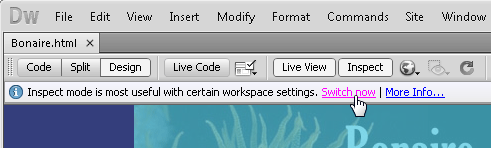
1. To use CSS inspect, click the Inspect button at the top of the workspace to activate inspect.

2. Click on the text link Switch Now (it appears just below the Inspect button).

The Switch Now link automatically changes the Dreamweaver program layout to best take advantage of the CSS Inspect feature.
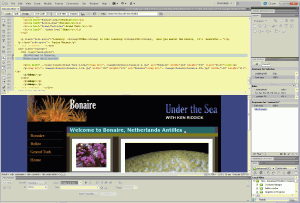
3. Once it’s activated, roll your cursor around the screen to use CSS Inspect.

As you do, Dreamweaver highlights content in the Design View area with color-coded highlighting that identifies each tag and associated style, as well as any margins and padding created by the style rule.

Simultaneously, Dreamweaver identifies the corresponding code in Code View, and displays the corresponding style rules in the CSS Styles panel. Click the Inspect button again to turn off CSS Inspect.

css, dwcs5, dwcs6

Leave a Reply Cancel reply

Your email address will not be published. Required fields are marked *

You may use these HTML tags and attributes: <a href="" title=""> <abbr title=""> <acronym title=""> <b> <blockquote cite=""> <cite> <code> <del datetime=""> <em> <i> <q cite=""> <strike> <strong>

Share with your friends

Dreamweaver Tutorials

  • Creating websites with Dreamweaver HTML templates (.dwt)
  • What’s the difference between a website & blog?
  • 6 Reasons to Upgrade to Dreamweaver CS6
  • Tracking web traffic: Google Analytics vs other traffic counters
  • Creating Responsive Designs with Dreamweaver CS6 Fluid Grid Layout

Popular books & videos

  • Dreamweaver CS6 Video

    DW-Video-250
    Designing for Multiple Screens with Fluid Grid Layouts
    Discover how to create web designs that look great on large and small screens. From smartphones to tablets to desktops, the new Fluid Grid Layout in version CS6 makes it easier than ever to set up media queries and design websites with HTML5 and CSS3. More Info »
    $49.99$39.99

    View Cart / Checkout
  • Dreamweaver CS5 Part 3: The New Features

    Dreamweaver-CS5-whats-new
    Training Video DVD
    Upgrading to CS5? Get just the training you need when you upgrade. This video covers the hottest new additions to Dreamweaver's toolset with a focus on how to put these great new features to work right away. More Info »
    $24.99

    View Cart / Checkout
  • Dreamweaver CS5 Crash Course

    Dreamweaver CS5 Crash Course Part 1
    Dreamweaver video DVD
    Dip into web design and learn Dreamweaver fast with this engaging video. More Info »
    $24.99

    View Cart / Checkout
  • Dreamweaver CS4 Essentials

    Dreamweaver CS4 Training Video
    Training Video DVD
    Janine's delightful sense of humor (and The Chocolate Game website) make learning web design with Dreamweaver CS4 more fun in this comprehensive 5-hour course. More Info »
    $39.99

    View Cart / Checkout
  • Dreamweaver CS3 Essentials

    Dreamweaver CS3 Training Video
    By Janine Warner Created with TotalTraining Janine’s patience and delightful sense of humor make learning web design with Dreamweaver CS3 fun. Learn everything you need to build websites with Dreamweaver in this comprehensive 8-hour course. You’ll get up to speed fast with the basics of setting up a site and creating your first web pages, More Info »
    $24.99

    View Cart / Checkout
© 2001 - 2013 All rights reserved. DigitalFamiliy.com was created by Janine Warner | Terms & Conditions of Use | Privacy Policy
  • Home
  • Store
  • Consulting Services
  • Web Tutorials
  • Dreamweaver
  • FAQ
  • About Us
  • Contact