
Web Design Training courses, videos & tutorials at DigitalFamily.com
Web design & Internet trends
books, videos, training & consulting
  • Home
  • Store
    • Web Design Books
    • Dreamweaver Videos
    • Expression Web Videos
    • Products
    • Shopping Cart
    • Order Status
  • Consulting Services
  • Web Tutorials
    • Web Design 101
    • Mobile and Responsive Web Design
    • Social Media
    • Online Reputation
    • Dreamweaver
    • Expression Web
    • Cascading Style Sheets
    • WordPress
  • Dreamweaver
    • CS6 Tutorials
    • CS5 Tutorials
    • CS4 Tutorials
    • CS3 Tutorials
  • FAQ
    • Dreamweaver
    • CSS
    • Graphics
    • WordPress
    • Ask the Author
  • About Us
    • About DigitalFamily.com
    • About Janine Warner
  • Contact
Search the site...
Home» Tutorials » Dreamweaver » Quick Look: Discover the New Features in Dreamweaver CS5

Quick Look: Discover the New Features in Dreamweaver CS5

Posted by Janine Warner - September 11, 2012 - Dreamweaver, Dreamweaver CS5
0

Here are some of the best new features that Adobe added to Dreamweaver CS5:

1. The New, Simpler, Site Setup Process

Set up new sites up faster in Adobe Dreamweaver CS5 and set up multiple servers for any site. This is a great way to manage a testing server and live server for the same Web site.

Dreamweaver CS5 Site Set Up

2. Turn Styles On and Off with CSS Enable/Disable

Test your styles by turning any rule on or off — a great way to troubleshoot conflicting styles and see how your page will work without having to delete a style rule to test it.

3. Checking Your Code with CSS Inspect

Get a preview of the code on your pages with this interactive feature that makes it easy to quickly identify how styles and XHTML work together in your page designs.

4. Spell Check in 37 Languages: si, oui, ja, da, yes!

If you’re working on a site in multiple languages this feature will make your life easier and your site more accurate.

5. Extending Dreamweaver with the Widget Browser

Add slideshows, drop-down menus, and more with the Widget Browser, which makes it easy to add all kinds of special features from the growing list of widgets to your site. Most are created in JQuery or AJAX.
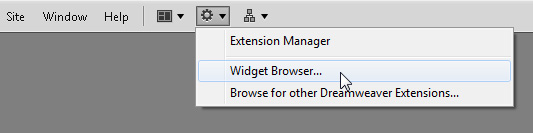
Widget Browser

6. New Support for WordPress in Dreamweaver

Dreamweaver CS5 now supports multiple levels of include files so it can display WordPress themes better than ever. This improvement also makes Dreamweaver better equipped to handle two of the most popular, open-source content management systems, Joomla! and Drupal, as well.

7. Using Live Code and Live View with Dynamic Sites

These enhanced features make it easier to edit the code, and the styles, for dynamic sites, including those created with WordPress, Joomla!, and Drupal.

8. Testing Your Pages with Browser Lab

See what your pages will look like in a variety of Web browsers, including the dreaded Internet Explorer version 6, as well as versions 7 and 8, Firefox, Safari, and Chrome.
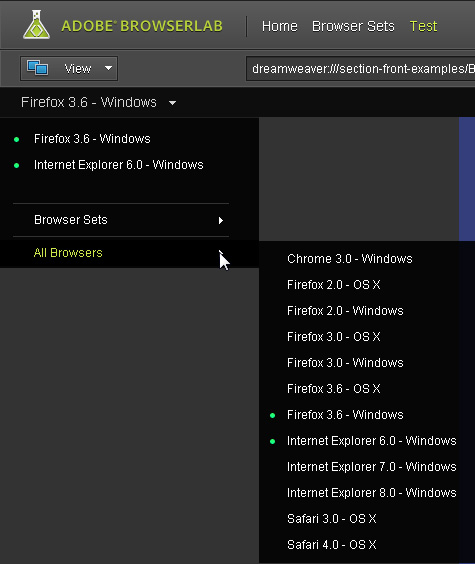
Preview Pages with Browsers on Windows or Mac

9. Sharing Your Screen with CSXS

Use CSXS to access Adobe Connect directly from Dreamweaver, a great way to collaborate with other web designers and show off your designs to your clients without ever leaving your desk (or changing out of your pajamas).

10. Business Catalyst

This new suite of online tools adds everything from an eCommerce shopping cart to customer relationship management (CRM) tools to bulk email services. Adobe acquired this company and integrated their entire collection of online tools into Dreamweaver. Learn more about the service at www.BusinessCatalyst.com.

dwcs5

Leave a Reply Cancel reply

Your email address will not be published. Required fields are marked *

You may use these HTML tags and attributes: <a href="" title=""> <abbr title=""> <acronym title=""> <b> <blockquote cite=""> <cite> <code> <del datetime=""> <em> <i> <q cite=""> <strike> <strong>

Share with your friends

Dreamweaver Tutorials

  • Creating websites with Dreamweaver HTML templates (.dwt)
  • What’s the difference between a website & blog?
  • Tracking web traffic: Google Analytics vs other traffic counters
  • Review: What’s the Best Way to Add eCommerce Or a Shopping Cart to a Website?
  • How to Test a Website in Different Browsers: Internet Explorer, Firefox, Safari, Chrome

Popular books & videos

  • Dreamweaver CS6 Video

    DW-Video-250
    Designing for Multiple Screens with Fluid Grid Layouts
    Discover how to create web designs that look great on large and small screens. From smartphones to tablets to desktops, the new Fluid Grid Layout in version CS6 makes it easier than ever to set up media queries and design websites with HTML5 and CSS3. More Info »
    $49.99$39.99

    View Cart / Checkout
  • Dreamweaver CS5 Part 3: The New Features

    Dreamweaver-CS5-whats-new
    Training Video DVD
    Upgrading to CS5? Get just the training you need when you upgrade. This video covers the hottest new additions to Dreamweaver's toolset with a focus on how to put these great new features to work right away. More Info »
    $24.99

    View Cart / Checkout
  • Dreamweaver CS5 Crash Course

    Dreamweaver CS5 Crash Course Part 1
    Dreamweaver video DVD
    Dip into web design and learn Dreamweaver fast with this engaging video. More Info »
    $24.99

    View Cart / Checkout
  • Dreamweaver CS4 Essentials

    Dreamweaver CS4 Training Video
    Training Video DVD
    Janine's delightful sense of humor (and The Chocolate Game website) make learning web design with Dreamweaver CS4 more fun in this comprehensive 5-hour course. More Info »
    $39.99

    View Cart / Checkout
  • Dreamweaver CS3 Essentials

    Dreamweaver CS3 Training Video
    By Janine Warner Created with TotalTraining Janine’s patience and delightful sense of humor make learning web design with Dreamweaver CS3 fun. Learn everything you need to build websites with Dreamweaver in this comprehensive 8-hour course. You’ll get up to speed fast with the basics of setting up a site and creating your first web pages, More Info »
    $24.99

    View Cart / Checkout
© 2001 - 2013 All rights reserved. DigitalFamiliy.com was created by Janine Warner | Terms & Conditions of Use | Privacy Policy
  • Home
  • Store
  • Consulting Services
  • Web Tutorials
  • Dreamweaver
  • FAQ
  • About Us
  • Contact