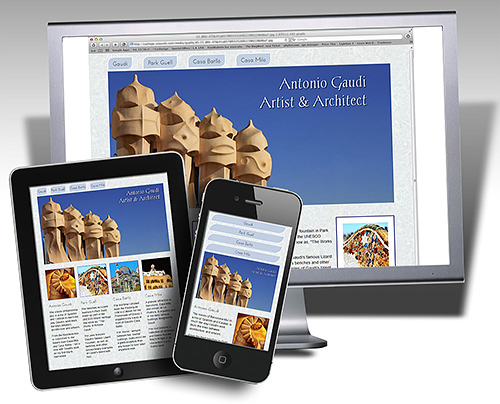
If you're ready to dive into the latest flavor of HTML, Dreamweaver CS5.5 offers two new HTML5 Layouts, complete with CSS style rules, to give you a head start.
This lesson shows you how to edit one those layouts by editing the CSS to change the background color, font face, and other design features. Even if you've been using HTML and CSS for a while, you're sure to appreciate the head start these layouts offer and how easy it is to customize the designs in Dreamweaver.
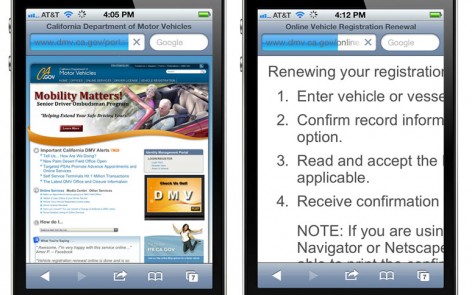
Seems all the cool websites have a big, rotating box or interactive slideshow these days -- and they don't design them with Flash anymore because Flash doesn't work on iPhones, iPads, and many other mobile devices.
So how do they do it? And how hard is it to add interactive features to your own website? The answer is.... easier than you might imagine, if you use a Dreamweaver extension like the one featured in this tutorial.
Most of the slideshows and other interactive features that work on iPads andiPhones are created usinga Javascript framework, such as jQuery, in combination with CSS and HTML. The advantage is that these Javascript works on many devices that don't support Flash.
When is it better to create a Native App, the kind that has to be downloaded from the iTunes store, vs a Web App or mobile website for browsers?
What is the difference between iPad & iPhone Apps, Android Apps, and other Native Apps, when compared with Web Apps that play in Safari and other web browsers?
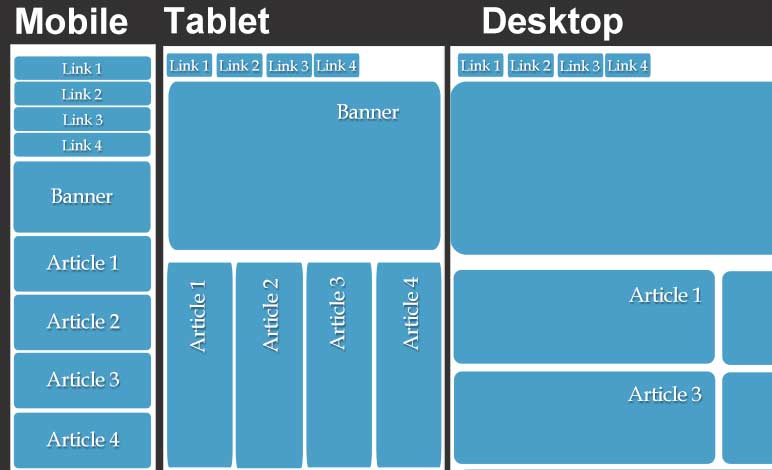
This comparison table will help you better understand your options and why some sompanies are creating both a native app and a web app.
A starter guide to the best iPad apps everFresh out of the box, every iPad comes with a few basic options – a web browser, maps, email program, and a few games and utilities.
You can download more games, and use apps to keep up with the news, make travel arrangements, and well… there’s an app for just about everything.
After scouring dozens of categories to find the best app on the iPad, I discovered that the “Best” app really depends on who you are, what you like, and what you’re doing. (Read Janine's review of best iPad apps)
Create beautiful designs for the iPhone and iPad.
Using the latest in HTML5 and CSS 3, you can create web designs that fit the exquisite touchscreen.
I've played with all the geeky toys over the years. but the iPad takes interactive design to a whole new level.
Learning is more fun with Janine's Training Videos.
Cascading Style Sheets (CSS)
Get just the training you need to upgrade.
Order the Dreamweaver CS5 DVD by Janine Warner.
Check out Janine's other training videos.
Partners and sponsors
Check out these Directtv deals
Subscribe to the KelbyTraining library and get all of Janine's CS5 videos